
The Invisible Foundation Nobody Really Understands
Fifteen years of tech writing have taught me one absolute truth: most people use the internet daily without understanding how it works. They click a link, load a webpage, send an email, and stream video. To them, the experience feels magical instant, seamless, and effortless.
However, an incredibly complex system of protocols, standards, and infrastructure powers that magic. At its foundation lie TCP/IP and DNS two protocols so essential that the internet as we know it would cease to exist without them.
As a web specialist, I have spent countless hours analyzing network infrastructure, tracking how data moves across the globe, and studying the protocols that make it possible. It strikes me how the engineering decisions of the 1970s and 1980s still drive almost everything we do online. It is remarkable that protocols designed when computers were massive mainframes, storage was measured in kilobytes, and bandwidth in bits per second now handle billions of simultaneous connections, petabytes of data, and 4K video streaming.
In this deep dive, I will move beyond the surface-level explanations found elsewhere. I will explain what TCP/IP is, how it differs from other network approaches, how DNS translates human-readable web addresses into machine-readable IP addresses, and why these two technologies form the irreplaceable backbone of modern internet infrastructure.
TCP/IP
This isn’t just historical trivia. Understanding TCP/IP and DNS reveals how the internet functions, why certain limitations persist, where security vulnerabilities arise, and what the future of internet protocols holds. Whether you are a developer building applications, a business leader managing infrastructure, or simply someone curious about the world, this knowledge matters.
Would you like me to dive into the technical details of how the TCP three-way handshake functions, or would you prefer to start with the hierarchical structure of the Domain Name System?
What Is TCP/IP? The Protocol That Changed Everything
TCP/IP is a suite of communication protocols that defines how data is transmitted, routed, and received across interconnected computer networks. The name itself represents two distinct but complementary protocols: TCP (Transmission Control Protocol) and IP (Internet Protocol).
But this definition barely scratches the surface. Let me explain what this actually means in practical terms.
The Core Problem TCP/IP Solves
To understand why TCP/IP matters, you must understand the problem its creators set out to solve.
In the early days of computing (1960s–1970s), computer manufacturers like IBM, Digital Equipment Corporation (DEC), Burroughs, and Univac each used proprietary networking standards. If you owned a network of IBM computers, they communicated beautifully. But if you tried to connect an IBM computer to a DEC system? Impossible. The two systems spoke completely different languages.
This created a massive problem: networks could not talk to each other. Organizations operated isolated islands of computers, with no way to connect those islands into a unified, global network.
Military researchers at DARPA (Defense Advanced Research Projects Agency) faced this exact challenge. They wanted to build a network that could survive a catastrophic event by eliminating any single point of failure. They needed a system where data could travel from any computer to any other computer, regardless of the manufacturer or the underlying network technology.
Engineers designed TCP/IP as the solution to this problem: a universal, manufacturer-agnostic protocol that allowed any computer to communicate with any other computer.
This shifted the entire paradigm. Instead of asking, “How do we make IBM and DEC networks talk?” the researchers asked, “How do we create a universal standard that all networks can adopt?” It was the difference between building individual bridges between islands and creating a common ocean that all ships could navigate.
Would you like to explore how the packet-switching model of TCP/IP physically routes data across these networks, or should we look at how the layers of the TCP/IP stack organize this communication?
The Layered Architecture: How TCP/IP Organizes Communication
This is where understanding TCP/IP becomes genuinely useful. TCP/IP is organized in layers, with each layer handling a specific aspect of network communication.
Think of it like mail delivery. The postal system has layers:
- The person writing the letter (application)
- The envelope and address system (network routing)
- The postal trucks and delivery routes (physical infrastructure)
- The rules for handling damaged packages and retrying delivery (error correction)
TCP/IP works similarly, with several distinct layers:
Layer 1: The Physical Layer
This is the actual hardware copper cables, fiber optics, radio waves, ethernet connections. The physical layer handles the transmission of raw bits (1s and 0s) from one computer to another.
From a web specialist’s perspective, you don’t typically need to understand this layer in detail. Your internet service provider handles it. But it’s important to know that the physical layer is responsible for ensuring reliable transmission of data across whatever medium connects two computers directly.
Layer 2: The Data Link Layer
This layer handles communication between devices on the same local network. If your computer and another computer are both connected to the same router, they use the Data Link layer to find each other and send data directly.
The most common Data Link layer protocol is Ethernet, which uses MAC (Media Access Control) addresses to identify devices on a local network. Your computer’s MAC address is like its local phone number it identifies your device on your specific network.
Layer 3: The Network Layer — Where IP Lives
This is where Internet Protocol (IP) operates, and it’s genuinely crucial to understand what IP does.
IP is responsible for routing data from a source computer to a destination computer, potentially across multiple networks and possibly across the entire globe.
Here’s the critical insight: Internet Protocol IP doesn’t care about the content of the data. It doesn’t care if you’re sending an email, watching video, or downloading a file. It’s only cares about one thing: getting data from point A to point B.
Each device on the internet has an IP address a unique numerical identifier. In IPv4 (the version most of us grew up with), an IP address looks like 192.168.1.1. It’s a 32-bit number, which allows for about 4.3 billion unique addresses. In IPv6 (the newer version), addresses are much longer and can represent trillions of unique devices.
When you send data over the internet, it gets divided into small chunks called packets. Each packet has a header that contains:
- The source IP address (where the data is coming from)
- The destination IP address (where the data is going)
- Information about how to reassemble the packet if it gets fragmented
- A Time-To-Live (TTL) value that prevents packets from circulating forever
IP then hands these packets to routers specialized computers whose only job is to look at the destination IP address and figure out which direction to send the packet. Routers connected to other routers create a mesh network where data can travel from any point to any other point by hopping through intermediate routers.
This is genuinely elegant. No central authority controls routing and no single entity need to know the entire path from source to destination. Each router just needs to know the next hop. This distributed approach is why the internet is so resilient if one router fails, data finds alternate routes automatically.
Layer 4: The Transport Layer — Where TCP (and UDP) Live
Here’s where things get interesting, because TCP actually solves a critical problem that IP creates.
IP gets your data to the destination, but IP has a dirty little secret: it doesn’t guarantee delivery. Packets can get lost, duplicated, reordered, or corrupted. IP just does its best to move data forward, but makes no promises.
For many applications, this is unacceptable. If you’re sending an email, you need to know it arrived completely and in the right order. If you’re transferring money, you need every byte to arrive intact. This is where TCP (Transmission Control Protocol) comes in.
TCP takes the unreliable packet delivery that IP provides and creates a reliable connection on top of it. When you use TCP:
- A connection is established before data is sent (the famous “three-way handshake”)
- Data arrives in order — even if packets arrive out of order, TCP reorders them
- Delivery is guaranteed — if packets are lost, TCP detects this and resends them
- Corruption is detected — if data arrives damaged, TCP asks for retransmission
- The connection is properly closed when communication is complete
This makes TCP reliable but also slower than the underlying IP layer, because TCP needs to wait for acknowledgments and handle retransmissions.
But there’s an alternative: UDP (User Datagram Protocol). UDP is like TCP’s reckless cousin. It’s fast and lightweight but provides no guarantee of delivery or ordering. UDP is perfect for applications where speed matters more than perfect accuracy like video streaming (you don’t care if you lose one frame) or online gaming (you care more about responsiveness than perfect data integrity).
Layer 5+: The Application Layer
Above TCP/UDP sits the application layer, where actual user-facing protocols live. HTTP and HTTPS (the protocols that power websites), SMTP (email), FTP (file transfer), DNS (which we’ll discuss extensively), SSH (secure shell), and dozens of other protocols all operate at the application layer.
These protocols define how specific applications communicate using the underlying TCP/IP infrastructure.
The Beauty of Layered Architecture
What’s genuinely brilliant about this layered approach is separation of concerns. Each layer handles one specific job and doesn’t need to understand the layers above or below it.
A web browser doesn’t need to know anything about IP routing. It just needs to know how to speak HTTP. HTTP doesn’t need to know about TCP’s reliability mechanisms but just sends data and trusts that TCP will handle delivery. TCP doesn’t need to know about routers or IP addressing. It just knows that IP will move packets toward a destination.
This separation allowed innovation at each layer independently. We’ve improved IP routing algorithms without changing how TCP works. And we’ve created new application protocols without changing TCP/IP itself. This is why TCP/IP has proven so durable it provides a stable foundation that new technologies can build upon.
How TCP/IP Actually Works: The Journey of a Data Packet
Now let me walk you through exactly what happens when you do something simple, like visit a website. This will illustrate how TCP/IP actually functions in practice.
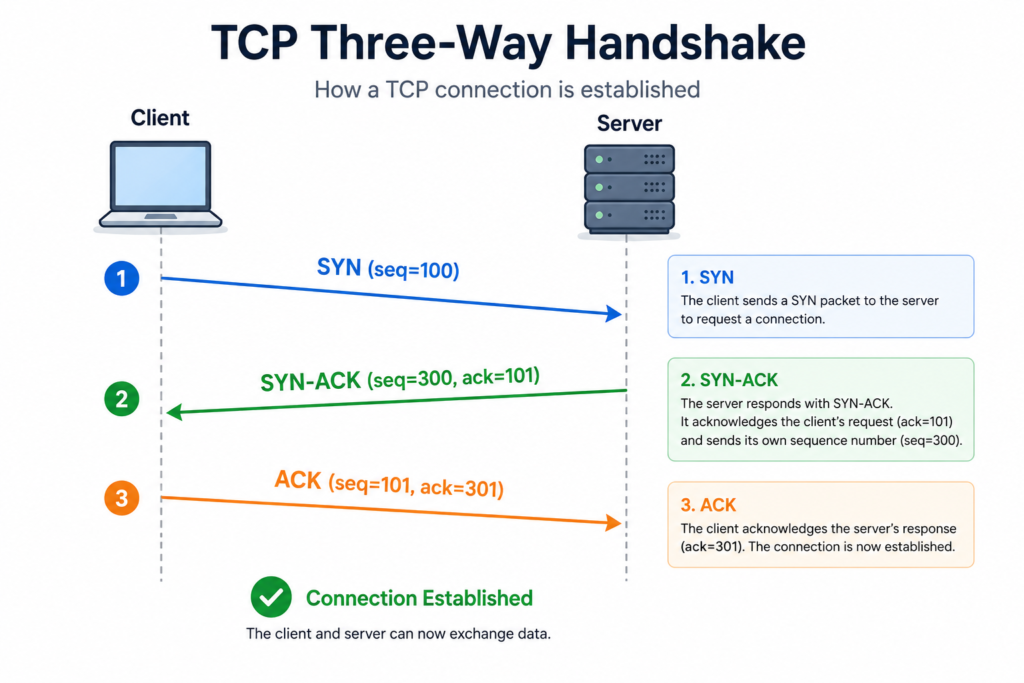
Step 1: The Connection Handshake
You type a URL into your browser: www.example.com. Before any data can flow, your computer and the server need to establish a TCP connection. This happens through the famous three-way handshake:
SYN: Your computer sends a packet with the SYN (synchronize) flag set to the server’s IP address, essentially saying “I want to talk to you. Here’s my sequence number.”
SYN-ACK: The server receives this, and responds with its own sequence number and an acknowledgment of yours, saying “I heard you. Here’s my sequence number.”
ACK: Your computer receives the SYN-ACK and sends back an acknowledgment, saying “Great, I heard you too. We’re ready to communicate.”
From a practical perspective, this takes milliseconds, but it’s a critical step. This handshake ensures both sides agree to communicate and establishes sequence numbers that TCP will use to order data correctly.
Step 2: The Data Transfer
Once the connection is established, your browser sends an HTTP request. This request might look something like:
GET / HTTP/1.1Host: www.example.comUser-Agent: Mozilla/5.0...This entire request gets wrapped in TCP headers (including the sequence number and other control information), then wrapped in IP headers (including source and destination IP addresses), then wrapped in Data Link layer headers, and finally transmitted over the physical layer as electrical signals or radio waves.
Here’s the crucial part: the web server receiving your HTTP request doesn’t know or care that it traveled over TCP/IP. From the server’s perspective, it just receives the HTTP request. The TCP/IP machinery handles all the complexity of getting those bytes across the network reliably.
Step 3: Packet Loss and Retransmission
Let’s say one of the packets containing part of the server’s response gets lost in transit (maybe a router was temporarily overwhelmed, or there was electromagnetic interference on a wireless link).
TCP detects this because it uses sequence numbers. The server sent packets with sequence numbers 1, 2, 3, 4, 5. Your computer receives 1, 2, 4, 5 but not 3. Your computer waits a moment and then sends back an acknowledgment saying “I received everything up to sequence 2, please resend starting from 3.”
The server resends packet 3. Your computer receives it, reorders the packets correctly, and delivers them to the browser in the proper sequence.
None of this is visible to the browser. The browser just receives a complete, intact HTTP response, completely unaware that some packets had to be retransmitted.
Step 4: Connection Close
When the data transfer is complete, the connection is closed through a similar handshake process (FIN, FIN-ACK, ACK), which ensures both sides know the conversation is over and can clean up their resources.
Why This Matters
What’s remarkable about this process is the reliability layer built on top of an unreliable foundation. The underlying IP network makes no promises. Routers can drop packets. Links can fail. But TCP builds a reliable communication channel on top of this unreliability.
This is a fundamental principle in computer science: you can build reliable systems from unreliable components. This principle appears throughout computing, and TCP is one of its most successful implementations.
DNS: The Hidden Protocol That Makes the Web Usable
Now let’s talk about DNS, because TCP/IP solves the problem of routing data, but it creates a new problem: how do you actually know what IP address to send data to?
You don’t memorize IP addresses, remember domain names, visit google.com, not 142.250.185.46 (which is one of Google’s actual IP addresses). DNS (Domain Name System) is the protocol that translates human-readable domain names into machine-readable IP addresses.
The Problem DNS Solves
In the early days of the internet, there was a single file called HOSTS.TXT that mapped domain names to IP addresses. It was maintained on a central server at Stanford, and computers would download it and update their local copy.
This worked when there were a few dozen computers on the network. But as the internet grew, this approach became completely unscalable. You needed a way to distribute the mapping of names to IP addresses across many computers worldwide, without any single point of failure.
DNS was designed to solve this problem, and it’s genuinely one of the most elegant systems ever created.
How DNS Actually Works: A Hierarchical System
DNS is a distributed, hierarchical database that maps domain names to IP addresses. Let me break down how this actually works.
The Root Name Servers
At the top of the DNS hierarchy are the root name servers. There are 13 of them (technically more now through anycast replication), and they’re distributed around the world. These servers don’t know every domain name on the internet. That would be impossible.
Instead, they know where to find the next level of the hierarchy: the Top-Level Domain (TLD) servers.
TLD Name Servers
TLD servers handle specific top-level domains like .com, .org, .edu, .uk, etc. When you ask a TLD server about example.com, it doesn’t know the IP address. But it knows which nameserver is responsible for the example.com domain.
Authoritative Name Servers
The authoritative nameserver for a specific domain (like example.com) is maintained by whoever registered that domain. This is where the actual mapping of names to IP addresses lives. When you register a domain with a registrar like GoDaddy or Namecheap, they manage an authoritative nameserver that contains the actual DNS records for your domain.
The Complete DNS Query Process
Let’s trace what happens when you type www.example.com into your browser:
Step 1: Your computer sends a query to a recursive resolver (usually maintained by your ISP or a service like Google’s 8.8.8.8). This resolver says “I don’t know what www.example.com is, but I’ll find out for you.”
Step 2: The resolver queries a root nameserver, asking “Where can I find information about .com domains?” The root nameserver responds with the IP address of the appropriate TLD nameserver.
Step 3: The resolver queries the TLD nameserver, asking “Where can I find information about example.com?” The TLD nameserver responds with the IP address of the authoritative nameserver for example.com.
Step 4: The resolver queries the authoritative nameserver, asking “What’s the IP address for www.example.com?” The authoritative nameserver responds with the actual IP address.
Step 5: The resolver sends this IP address back to your computer, which uses it to establish a TCP connection to the web server.
All of this typically happens in under a second, but it involves multiple round trips across the internet. This is why DNS caching is so important.
DNS Caching: The Performance Critical Layer
If every single DNS query had to go through all five steps, the internet would be incredibly slow. That’s why DNS uses aggressive caching at multiple levels.
Your computer caches DNS responses and your ISP caches DNS responses. The recursive resolver caches DNS responses. Even the root and TLD nameservers cache responses. When millions of people visit google.com, Google’s IP address is cached at thousands of places, so only the first request actually goes through the full query process.
This is why DNS is so robust. Even if many nameservers go down, cached responses keep things working. Thus why DNS changes take time to propagate cached responses take hours or even days to expire.
DNS Record Types: More Than Just Address Mapping
DNS does more than just map domain names to IP addresses. There are several types of DNS records, each serving different purposes:
A Record: Maps a domain name to an IPv4 address (the most common type)
AAAA Record: Maps a domain name to an IPv6 address (for the newer IPv6 protocol)
CNAME Record: Maps a domain name to another domain name (useful for aliasing)
MX Record: Specifies which server handles email for a domain
TXT Record: Stores arbitrary text, often used for domain verification or security
NS Record: Specifies which nameserver is authoritative for a domain
These record types allow DNS to handle far more than just web traffic. Email systems rely on MX records. Security systems use TXT records. Content delivery networks use CNAME records to distribute traffic globally.
Read